





PRO
Five-column comparison table with headings like "Company Product", "Target Customer", "Key Benefits", "Price", and "Value Proposition".

PRO
Wide table with color-coded columns and keyword rows with arrow indicators

PRO
Horizontal table with six columns and two rows; bold headers in purple; placeholders for company, product, target customer, benefits, price, and value.

PRO
Vertical list of four rectangular blocks with large numbered tags (01–04) in bold colored tabs on the left. Each block has placeholder text.

PRO
Split layout: stacked column chart on the left and a pie chart on the right; both use bright colors.

PRO
Horizontal bar chart with six uniform bars labeled “Logo.” Minimal text and evenly spaced layout.

PRO
Two-part segmented circle infographic in the center, each half labeled 1 and 2 with adjacent text boxes.

PRO
Calendar-based Gantt chart with vertical month divisions and horizontal task bars; markers for milestones.

PRO
Left chart is a line chart for 3 series; right chart is a stacked area for 2 series. Split visual structure balances time and category views.

PRO
Two-column layout with a stacked area chart on the left and bulleted text on the right

PRO
A 2x2 grid in puzzle piece format, each colored block represents SWOT elements: Strength (purple), Weakness (light purple), Opportunity (pink), Threat (red).

PRO
Flowchart-style org chart using ovals connected with arrows, branching horizontally and vertically. Circles contain placeholder "Text".

PRO
Combination slide with left side area chart and right side two donut charts (2023 and 2024) with percentages and text boxes underneath.

PRO
Minimalist transition slide with large “03” in orange and text “Quantitative Slides” underneath, on a beige background with a horizontal line.

PRO
A combination layout with a doughnut chart on the left and a simple line chart on the right.

PRO
Title on the top left. Single dark banner with heading, followed by three sections with subtitles and bulleted text. Minimalistic white background with black/blue text.

PRO
Three-segment vertical bars for four categories, left-aligned title, legend at bottom, logo in lower left corner, minimal design on white background.

PRO
Grid of icons on the left, with descriptive text on the right. Clean, light background with simple layout.

PRO
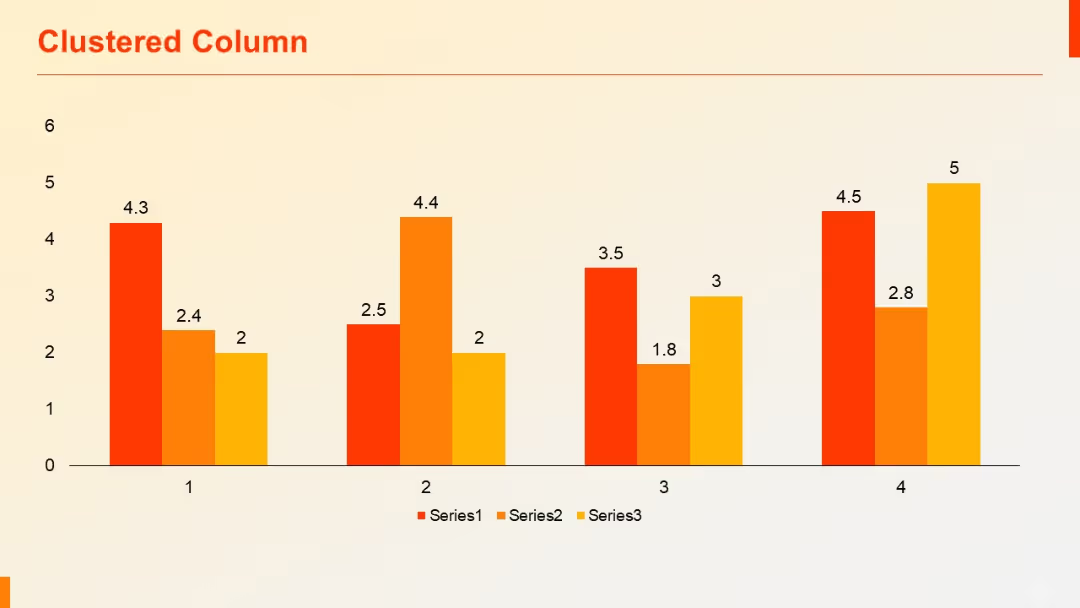
Clustered column chart showing performance of three series across four categories, with percentage values labeled above each bar.

PRO
Three-column layout with subtitle headers, evenly spaced across the slide; empty placeholders for future input.

PRO
Two-column grid of checklist items with six labeled boxes (01–06), each containing a title, description, and checkmark or cross.

PRO
Dark navy background with a central white line ending in a circle; bold section title at bottom left with logo.

PRO
Line chart on the left and horizontal bar chart on the right, both using the same categorical data. Equal spacing and balanced format.

PRO
Horizontal path divided into four sections with upward arrows, each block featuring editable title and body text along a progression path.

PRO
Dark background with minimal text. Single line extending from "More Charts" text to a circular node, ending in arrow dot graphics.

PRO
Three-column time-based table (Past, Present, Future) with thick row headers and check/cross indicators in color.

PRO
A five-column comparison table with colorful headers and checkmark/cross icons to indicate feature inclusion; purple-themed design.

PRO
Two vertical column charts side-by-side. Left chart uses dark blue; right chart uses cyan blue. Each bar represents one value per category.

PRO
Left chart is a basic area chart; right chart is a stacked area chart, both showing time series for two series with color differentiation.

PRO
Four vertically stacked chevrons on the left. Right side contains corresponding bulleted text sections. Alternating dark and light blue chevrons.
